
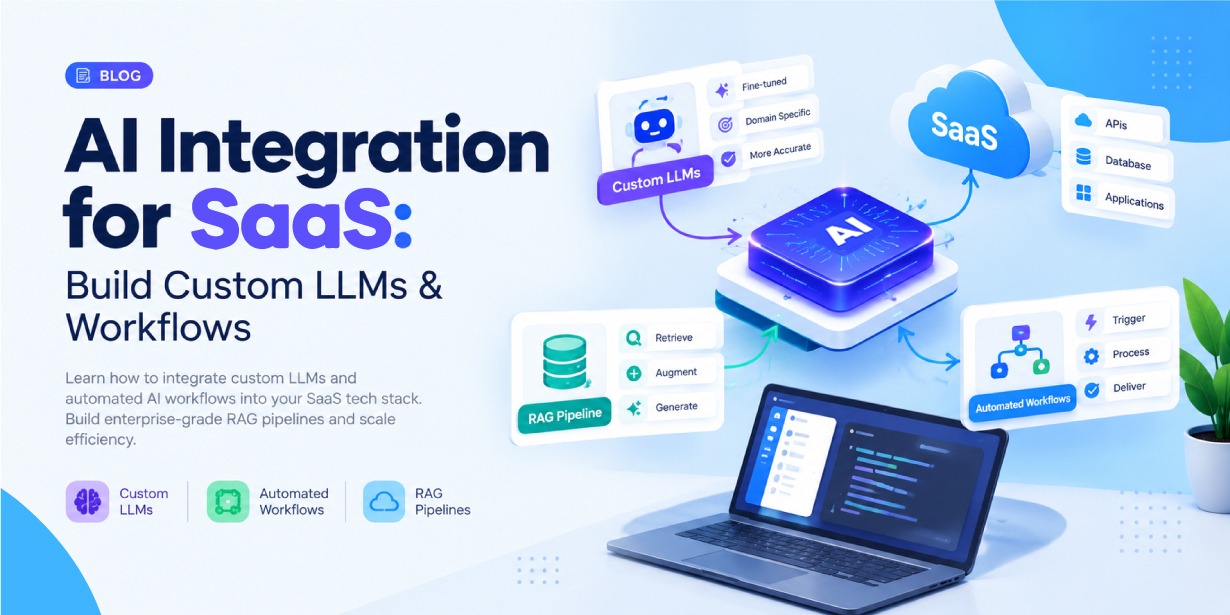
Any engineer can wire a text box to a hosted model API in an afternoon. The demo works, the room nods, and then the real work starts: making that feature accurate on a customer’s private data, safe across tenant boundaries, observable when it drifts, and cheap enough that finance does not flag it. That second phase is where most SaaS AI projects stall, and it is an architecture problem rather than a prompting one.
Done properly, AI integration for SaaS is the practice of making a model behave like any other production dependency. Buyers now expect a product to summarize their data, answer questions about their own account, and take routine actions on their behalf. Delivering that reliably means the model is one component in a system that also includes retrieval, workflows, permissions, queues, and monitoring.
It helps to be precise about what the label covers, because it spans a wide range of cost and risk:
- Basic LLM API calls. A fixed prompt in front of a foundation model. Cheap, quick, and blind to the customer’s data.
- AI-powered product features. Model calls wired into specific surfaces such as an “explain this” button or inline drafting, with context passed in on purpose.
- Custom LLM integration. A model chosen, configured, fine-tuned, or self-hosted for your domain, behind your own service and guardrails.
- RAG systems. The model answers from documents and records fetched at query time, with citations back to the source.
- AI workflow automation. An event triggers a model step (classify, extract, decide) and the result drives a downstream action.
- AI agents. The model plans, calls tools, reads the results, and iterates toward a goal inside hard permission limits.
Most shipping products combine several of these. A support tool might route tickets with a cheap classifier, draft replies with RAG, and update the CRM through an agent step once a human approves. The rest of this article covers how to build each layer inside a codebase that already exists and already has customers.
What Is AI Integration for SaaS?
AI integration means the model has the same access, constraints, and oversight as the rest of your application. It reads from the same database, honors the same tenant boundaries and role checks, calls the same internal services your engineers use, and reports into the same logging and metrics stack. When that is true, AI stops being a feature bolted to the side of the product and becomes part of how the product works.
Concretely, that shows up as summarization and drafting inside existing screens, search that returns answers with sources instead of a list of links, support automation that deflects repetitive questions and drafts grounded replies for agents, and enrichment that categorizes and cleans inbound records before a human sees them. It also shows up in less visible places: a workflow that approves low-risk refunds automatically and routes the rest for review, or a report that explains in one sentence why a metric moved.
The common thread is that the AI is subject to the product’s rules. A summary of an account only includes data the current user is allowed to see. A generated CRM note is written through the same API and audit log as a manual one. The model is a dependency with a contract, not a magic box.
Why SaaS Companies Are Moving Beyond ChatGPT Wrappers
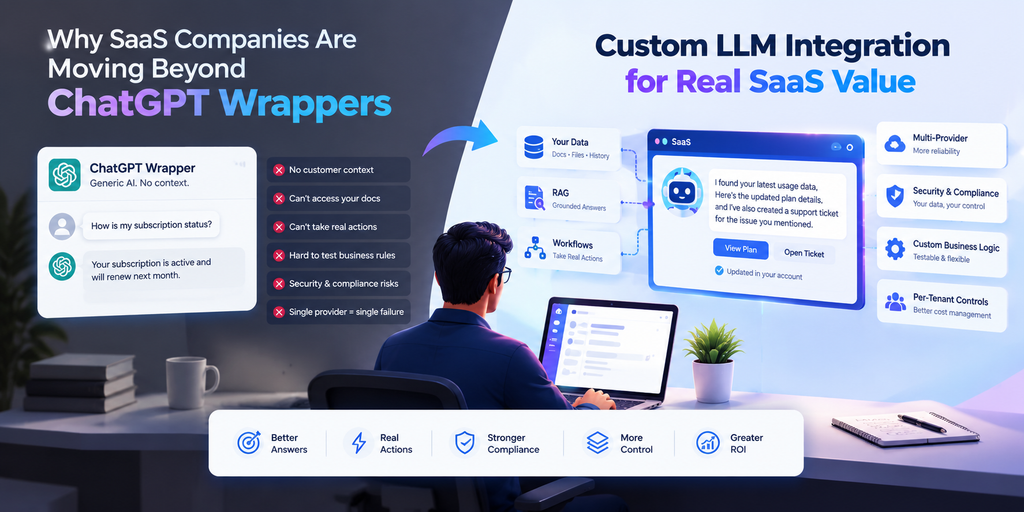
Teams evaluating LLM integration for a SaaS product usually start with a wrapper: a product whose AI value is a UI around a general-purpose model. That is often the right first move, and teams that skip it tend to over-build. But wrappers hit predictable ceilings.
The model answers from its training data, so responses sound competent but know nothing about the customer’s plan, usage, or history. Without retrieval, the model cannot cite your docs or the file the customer uploaded this morning. A chat box also cannot act: it cannot open a ticket, change a subscription, or write to the audit log. The value stops at text on a screen.
The operational ceilings matter just as much. Business rules end up encoded in prompts that are hard to test and easy to break. Customer data flows to a third party, which stalls deals with regulated buyers unless you have a data processing agreement, retention controls, and regional hosting. And one provider means one point of failure for pricing changes, model deprecations, and outages, with no fallback path.
A wrapper is genuinely enough when the task is low-stakes, a person reviews every output, the content does not touch private data, and volume is low. Internal brainstorming and drafting tools fit that description and do not need more.
Deeper work like custom LLM integration, retrieval, and automated workflows earns its cost when answers must be grounded in customer data, when the AI needs to take real actions, when compliance is on the table, when you need per-tenant cost limits, or when the feature matters enough that a quality regression would be an incident.
Custom LLM Integration vs. ChatGPT Wrapper
The choice between a wrapper and custom LLM integration comes down to how much of the stack you own. A wrapper hands orchestration, data access, and policy to the provider. A custom integration keeps those in your own service and usually still calls a hosted model for the raw generation. Owning the stack does not mean running your own GPUs.
The table frames the custom LLM vs ChatGPT wrapper decision for SaaS as a set of engineering trade-offs rather than a single verdict.
| Area | ChatGPT / Basic LLM Wrapper | Custom AI Integration |
| Data access | Limited to what the user pastes in | Product-specific, permission-aware, pulled at query time |
| Business logic | Encoded loosely in prompts | In services, with validation and tests |
| RAG | Limited or hand-rolled per feature | Configurable pipeline shared across features |
| Workflow automation | Limited to returning text | Events, tools, approvals, verification |
| Model selection | Whatever the provider offers | Routing across providers and model sizes |
| Security | Basic provider controls | Tenant isolation, RBAC, audit logs |
| Scalability | Bounded by provider limits | Queues, caching, workers sized to your load |
| Observability | Provider dashboards | Application-level tracing, cost, quality metrics |
| Customization | Low | High: fine-tuning, prompts, retrieval, guardrails |
Neither column wins outright. A common path is to ship the left column to prove demand, then migrate one feature at a time to the right column as usage, deal size, and compliance pressure grow.
How to Integrate a Custom LLM in a SaaS Application
Knowing how to integrate a custom LLM in a SaaS app is mostly about deciding where the AI-specific logic lives. The answer that holds up in production is a dedicated AI service between your application and any model, so prompt construction, retrieval, model routing, and output validation sit in one place instead of scattered across features.
Diagram 1: Custom LLM integration reference architecture.
SaaS Frontend
     |  authenticated request (what the user wants)
     v
Application API Layer   ->  authn/authz, tenant resolution, quota, validation
     |  clean request + trusted tenant context
     v
AI Service Layer        ->  prompt orchestration, model routing, guardrails
     |                 |                       |
     v                 v                       v
LLM (hosted or     Tools / Internal        RAG Retrieval
self-hosted)       APIs (per-call auth)    (vector DB + metadata filters)
                                                |
                                                v
                                          Primary DB / Object Storage
The frontend issues an authenticated request and never holds model credentials. The application API layer authenticates the user, resolves the tenant, checks the plan entitlement and usage quota, validates the payload, and forwards a clean request with a trusted tenant context. The AI service builds the prompt, picks a model, runs retrieval when needed, applies input and output guardrails, and streams or queues the response. The model (hosted, self-hosted, or several behind a router) does only generation. Tools and retrieval sit alongside it, each with its own permission check.
A workable sequence for adding this to an existing product:
- Define one use case. Pick a single high-value job with a measurable success bar. Write down the input, the expected output, and how you will judge quality.
- Choose a model. Match the model to the task. Reasoning-heavy work needs a stronger model; classification and extraction usually run well on a small, cheap one.
- Build the AI service. Create the module that owns all model interaction, with a narrow internal interface such as generate(), classify(), and embed().
- Wrap the model in an inference layer. Call the model through a client with timeouts, retries, and a fallback model configured, not a raw provider SDK call per feature.
- Connect application data. Give the service read access to the records it needs through existing internal APIs, scoped to the current tenant and user.
- Add retrieval. If answers must be grounded in documents or long histories, add a retrieval step before the prompt is assembled.
- Add tools and business logic. Define the actions the model may take as explicit, validated functions rather than free-form instructions.
- Add security controls. Enforce tenant isolation, filter sensitive fields out of context, cap token usage, and validate output before it is shown or acted on.
- Add observability. Trace every request with tenant ID, model, token counts, latency, cost, and outcome.
- Evaluate and deploy. Build an evaluation set of real inputs, measure quality before launch, roll out behind a flag, and watch the metrics after release.
Resist the urge to build the router, the eval harness, and three model providers in week one. The service boundary is what matters early. Everything behind it can be a single hardcoded model until the feature proves itself.
Designing an LLM API Architecture for SaaS
A production LLM API architecture is closer to a small platform than a single endpoint. Each concern below maps to a failure that shows up once real traffic arrives.
Edge and identity. All AI requests enter through one gateway so authentication, rate limiting, and logging are enforced once. Authentication uses your existing session or token system; AI endpoints are not special. Authorization checks that this user, on this plan, may run this feature against these records. Rate limits apply per user, per tenant, and globally, so one customer cannot exhaust capacity for everyone.
Request handling. Validate input, size, and shape before any model is called. Assemble prompts from versioned, tested templates rather than string concatenation. Route each request to a model based on task type, tenant tier, required context window, and current provider health. Manage conversation state deliberately, trimming or summarizing history so prompts stay inside a token budget instead of growing without limit.
Execution and failure. Stream tokens back for interactive features so users see progress. Move long or non-interactive generation onto a queue with a job ID the client can poll. Set aggressive timeouts, around 30 to 60 seconds for interactive calls, so a hung request never holds a thread or a database connection. Retry transient provider errors two or three times with exponential backoff, and fail over to an alternate model when the primary is down. Return structured, safe errors; never pass a raw provider response or stack trace to the client.
Accounting. Record input and output tokens, embedding calls, and tool invocations per request, attributed to a tenant, so billing and capacity planning have real numbers instead of estimates.
The frontend should not call model infrastructure directly, for the same reason it should not call your database directly. Client code is public, so any key it carries is already leaked, and the browser cannot be trusted to enforce tenant boundaries or output filtering. A server-side layer keeps credentials secret, keeps policy in one auditable place, and lets you switch providers without shipping a client release.
Building RAG Architecture for SaaS
Retrieval-augmented generation is how you get a model to answer from data it never saw in training without paying to fine-tune it on your content. You fetch the most relevant passages at query time and put them in the prompt. Building RAG architecture for SaaS means running two pipelines: an offline one that ingests and indexes content, and an online one that answers queries.
Diagram 2: End-to-end RAG pipeline for a multi-tenant SaaS product.
INGESTION  (offline, runs on content change)
  source doc / record
    -> normalize to clean text
    -> chunk (structure-aware: headings, list items, rows)
    -> embed each chunk
    -> upsert vector + metadata (tenant_id, doc_id, acl, updated_at)

QUERY  (online, per user request)
  user question
    -> rewrite / expand
    -> embed (same model as documents)
    -> vector search  +  metadata filter (tenant_id, user permissions)
    -> merge with keyword search (hybrid)
    -> re-rank candidates -> keep top 5-8
    -> assemble context (dedupe, fit token budget, keep citations)
    -> prompt -> LLM -> answer with sources
On the ingestion side, content from your database, uploaded files, and help center is normalized to clean text, split into passages, embedded, and written to the vector store with metadata attached. Chunk size is a real tuning decision: 512 to 1,024 tokens with 10 to 15 percent overlap is a reasonable starting point, and splitting on document structure beats a fixed character count because it stops answers from being cut in half.
On the query side, the question is optionally rewritten, embedded with the same model used for documents, and run through a vector search that is filtered by tenant and permissions in the same query. Semantic search alone misses exact identifiers, error codes, and product names, so combine it with keyword search and merge the results. Retrieve generously, 20 to 40 candidates, then re-rank with a cross-encoder or a small model down to the 5 to 8 passages that actually go in the prompt. More context is not better; irrelevant passages dilute the answer and cost tokens.
Two things make or break the result. Retrieval quality is the dominant lever: if the right passage is not in the retrieved set, no prompt wording recovers the answer, so measure retrieval on its own with a set of questions and known-good sources. And grounding has to be enforced: instruct the model to answer only from the provided passages and to attach a source to each claim, then show those sources in the UI so users can check them. Index freshness matters too. When a document changes, re-chunk and re-embed just that document, and delete vectors for removed content promptly, or the model will confidently cite text that no longer exists.
Vector Database Integration for SaaS
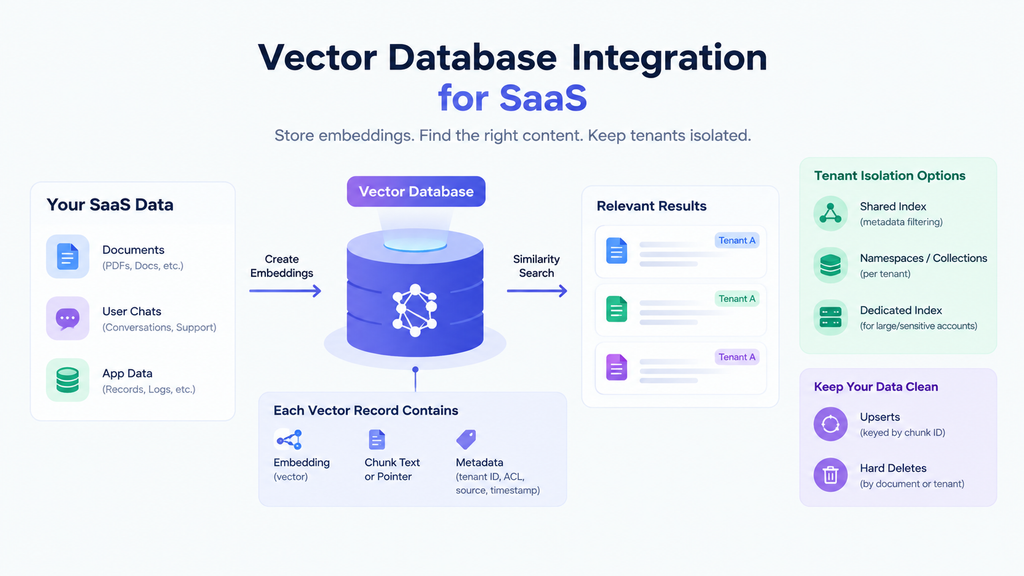
A vector database SaaS integration stores the embeddings for your content and returns the nearest matches to a query vector. What you keep next to each vector, and how you partition the index, is what makes retrieval both fast and safe in a multi-tenant product.
Each record holds the embedding, the chunk text or a pointer to it, and the metadata you filter and cite on: a tenant ID on every vector without exception, access-control tags when documents have per-user or per-group visibility, the source document ID and URL, and timestamps. The tenant filter is the single most important control in a shared index, and it belongs inside the search query so that the top-k results are already scoped. Filtering after the fact still lets the wrong documents influence ranking.
For isolation you have three broad options. A shared index with strict metadata filtering is simplest and scales to many small tenants. A namespace or collection per tenant adds physical separation and shrinks the blast radius of a filtering bug, at the cost of more objects to manage. A dedicated index per tenant suits a small number of large or sensitive accounts. Many teams mix these: a shared index for the long tail, namespaces for enterprise customers.
Whatever the layout, make deletes real. Support upserts keyed by chunk ID and hard deletes keyed by document or tenant, so that when a customer removes a file or churns, their vectors actually disappear rather than lingering in an index you forgot about.
Enterprise RAG Pipelines and Multi-Tenant Data
Enterprise RAG pipelines carry requirements a single-tenant prototype never has to think about. At this level, retrieval-augmented generation for SaaS is really a data-governance system that happens to call a model, and the vector index becomes a live projection of your permission model.
The hard part is that permissions move. Every time a document is shared, unshared, reassigned, or archived in the application, the retrieval layer has to agree, or a user runs a query and gets a passage from a document they lost access to last week. That failure does not throw an exception. It surfaces as a quiet cross-tenant or cross-team leak that a customer’s security team may find before you do.
Enterprise-grade retrieval therefore needs permission-aware queries that carry the requesting user’s effective access, not just tenant ownership; encryption of vectors, metadata, and cached responses at rest and in transit; audit logs recording who asked what, which sources were retrieved, which model answered, and what action followed; PII detection and redaction during ingestion and before any prompt is written to a log; and per-tenant retention that purges vectors, caches, and logs when a customer deletes content or leaves. Source attribution stops being optional, since every answer has to link to the exact passages so a user or an auditor can verify it.
None of this is exotic on its own. The complexity is keeping five systems consistent about the same permission facts: the application, the index, the cache, the logs, and the background jobs.
AI Workflow Automation for SaaS
SaaS workflow automation with LLMs uses the model as one step in a process rather than as the whole feature. The model classifies, extracts, or summarizes; the surrounding system decides what to do with that output and checks that it worked.
Realistic examples in a typical B2B product: classify inbound support tickets by topic, urgency, and product area and route them to the right queue; extract structured fields from uploaded invoices or contracts against a fixed schema; summarize an account before a renewal call; open a follow-up task when a conversation shows churn signals; draft categorized replies to inbound email for an agent to approve; assemble the narrative for a weekly report from metrics the product already computes; detect skipped onboarding steps and prompt the next one; flag anomalies in usage or billing with a short explanation.
The shift that matters is from a single call to a checked process:
Diagram 3: A one-shot model call versus a verified automated workflow.
Naive:
  LLM  ->  response  ->  (hope it is right)

Production:
  event
    -> AI decision (classify / extract / plan)
    -> validate output against schema + business rules
    -> scoped, permission-checked tool call
    -> business action (create / update / notify)
    -> verify the result looks sane
    -> log outcome; route low-confidence cases to a human
The model is the least reliable component in that chain, so the design assumes it will sometimes be wrong and puts a validation or a person between the model and anything irreversible.
Backend AI Workflow Automation Architecture
AI workflow automation for a SaaS tech stack should be event-driven and asynchronous, because model steps are slow and sometimes fail and do not belong on the path of a user request. The backend side of it is mostly plumbing that makes that safe.
A change in the product, a new ticket or an uploaded file, publishes an event onto a durable queue, which absorbs spikes and survives worker restarts. A pool of background workers consumes the queue, calls the AI service, and applies the results; you scale that pool independently of the web tier. For processes with more than one step, a workflow engine tracks progress, retries individual steps, and resumes after a crash instead of starting over. Recurring work like nightly re-indexing runs on a schedule.
Two properties keep this safe. Idempotency: key every job by the triggering event ID so a redelivered message does not create a duplicate task or double-charge a customer. Approval gates: pause the workflow and wait for a person before any consequential or irreversible action (sending a customer-facing message, moving money, deleting data).
A concrete run-through. A customer uploads a signed contract; an event fires. A worker sends the document through RAG ingestion, then calls the AI service to extract the renewal date, contract value, and key clauses against a fixed schema. Fields that come back below a confidence threshold are flagged rather than trusted. Valid fields are written to the account record, a task is created for the account manager, and the outcome, including which passage supported each field, goes to the audit log. If the model call fails, the job retries a few times with backoff and then pages an engineer. Meanwhile the HTTP request that handled the upload returned in milliseconds, and the user saw a processing state that resolved into a result.
Integrating Custom AI Models Into Software
There are several ways to integrate custom AI models into software, and they trade control against operational load. Most SaaS companies do not need to train a model from scratch, and aiming for that wastes months on a problem a hosted model plus retrieval already solves.
Calling a hosted foundation model is the default: lowest operational cost, strong general capability, fastest to ship, constrained by the provider’s pricing and data terms. Self-hosting an open-weight model on your own GPUs or a managed inference platform buys control over data residency and unit cost at scale, and costs you real infrastructure work and capacity planning. Fine-tuning adjusts a model’s weights on curated examples to lock in a format or tone; it changes behavior, not knowledge, and only pays off when prompting cannot get consistent structure and you have enough labeled data. Smaller dedicated models handle the narrow jobs: an embedding model for retrieval, a fast classifier for routing and moderation, speech or vision models where the product handles audio or images.
It is worth keeping the techniques straight, because they are often confused. Prompt engineering shapes behavior with instructions and examples and is always the first thing to try. RAG supplies knowledge at query time without touching weights and solves most “the model does not know our stuff” problems. Fine-tuning changes behavior, not facts. Training from scratch builds a base model from raw data at a cost that is almost never justified for a SaaS product.
A sound default: a hosted foundation model, RAG over your data, careful prompting, a small classifier for cheap routing, and fine-tuning held in reserve for the one or two tasks where output consistency genuinely matters.
AI Agents and Tool Calling in SaaS
An agent is a loop. The model gets a goal, picks an action, your system runs that action as a tool call, the result goes back into the context, and the model decides again until the goal is met or a limit trips. The chaining is what makes agents useful and what makes them risky, because the next action is not fully predictable.
Diagram 4: An agent loop over scoped SaaS tools: read steps first, then guarded writes.
Goal: "Follow up on this week's at-risk enterprise accounts."

  model -> plan
  model -> search_crm(risk=high, tier=enterprise)        [read]
        <- 4 accounts
  model -> get_account_activity(account_id)              [read]
        <- usage down 40%, 2 open tickets
  model -> create_task(owner, "Renewal check-in", due)   [write, validated]
        <- task #8821
  model -> send_notification(owner, summary)             [write, validated]
        <- delivered
  model -> report what was done
A tool is a named function with a strict input schema and a description of when to use it. Keep the set small and specific. A handful of well-defined tools beats a generic “run query” tool the model can point anywhere.
Tool definitions are explicit and typed, not free-form instructions to the model.
CREATE_TASK = Tool(
    name="create_task",
    description="Create a follow-up task for an account owner.",
    parameters={
        "account_id": "string",
        "title": "string",
        "due_date": "string (ISO 8601)",
    },
    requires_approval=False,   # a write, but low-impact and reversible
    handler=create_task_handler,   # runs as the acting user; args validated first
)
Every call runs under the acting user’s identity and is checked against that user’s permissions, exactly as the equivalent UI action would be. Arguments are validated against the schema and against business rules before execution, so an out-of-range value is rejected rather than passed through. Consequential actions (anything customer-facing, destructive, or financial) require explicit human approval. The loop itself is bounded: a cap on steps, a token budget, and a restricted tool set per context, with a hard stop when a limit is hit.
The safe default for agentic systems is deny-by-default. Read tools can be broad. Write tools are narrow and individually authorized. Destructive tools either do not exist or always route through a person. An agent that can only read and propose is far easier to ship than one that acts unattended, and it covers more real use cases than teams expect.
Security Considerations for SaaS AI Integration
AI features widen the attack surface in ways a standard application security review can miss. The mitigations below matter more than the threat names.
Prompt injection. Instructions hidden in a retrieved document, a user field, or fetched web content can override your system prompt. Treat all retrieved and user-supplied text as data, not instructions; keep system instructions structurally separate; constrain output to a schema; and never let model output trigger a privileged action without validation. Assume injection will happen and design so the worst case is a bad answer, not a bad action.
Cross-tenant access and data leakage. A missing filter in retrieval, caching, or a background job can surface one customer’s data to another, and the model can echo sensitive context back in its answer. Enforce the tenant filter centrally in the AI service rather than trusting callers, add it to every query automatically, strip sensitive fields from context before the prompt is built, and keep fixtures in the test suite that fail if a cross-tenant result ever appears.
Credentials and egress. Model provider keys live only on the server, in a secrets manager, scoped and rotated, never in a client bundle or a log line. If any tool fetches URLs, an attacker can aim it at internal services or a cloud metadata endpoint, so allow-list destinations, block private IP ranges, and route those fetches through an isolated egress path.
Output handling. Parse and validate every model response against an expected schema. Never render model output as HTML, pass it to a shell, or execute it without checks.
Logging and retention. Prompt and response logs are useful for debugging and dangerous for privacy. Redact PII before writing, restrict who can read them, and keep them for days, not months. Audit logs capture inputs, retrieved sources, model, output, and action taken; that is the record you will need to reconstruct an incident.
Encryption of vectors, metadata, caches, and logs at rest and in transit is assumed throughout, not a separate project.
Scaling AI Integration in a SaaS Tech Stack
The goal when scaling AI inside a modern SaaS tech stack is that expensive model work never slows down the rest of the product. Almost every choice below follows from that.
Keep AI services stateless and horizontally scaled behind a load balancer, and give them their own compute, queues, and connection pools. If the model provider gets slow, the visible effect should be a longer queue for AI features, not slow page loads everywhere. Anything a user is not actively watching (summaries, enrichment, report generation) belongs on a background queue where workers run at a sustainable rate and you can use cheaper batch pricing.
For interactive features, stream responses so perceived latency stays low even when total generation time does not, and route simple tasks to small fast models instead of sending everything to the largest one. Cache what repeats: embeddings for unchanged content, responses for identical prompts, retrieval results for common queries. Batch embedding and classification calls to cut per-request overhead. Under load, serve interactive user requests ahead of bulk jobs, and enforce per-tenant token budgets so one heavy account cannot starve the others or break the cost model.
Managing AI Costs
AI spend is usually dominated by one or two drivers, and knowing which one tells you where to look.
- Input tokens. Long system prompts, large retrieved context, full conversation histories. Often the biggest line item.
- Output tokens. Verbose responses. Cheaper to cap than input, but significant at volume.
- Embeddings. Trivial per call, expensive during initial indexing and large re-indexes.
- Vector storage and queries. Grows with corpus size and tenant count; some providers bill both.
- Inference. Per-call pricing on hosted models, or GPU hours plus idle capacity if you self-host.
The highest-return optimizations are usually on context. Trim system prompts, retrieve fewer and better passages, and summarize long histories instead of resending them. After that: cache aggressively, route classification and extraction to small models, batch embedding jobs, cap output length, and move anything asynchronous into the background where batch pricing applies. Better re-ranking is a quiet cost win. If you can send five strong passages instead of fifteen mediocre ones, you pay for a third of the context and often get a better answer.
Observability and Monitoring for AI-Powered SaaS
Standard monitoring tells you a request returned 200 in 800 milliseconds. For AI that is necessary and not sufficient, because a response can be fast, successful, and wrong.
Track the operational metrics first: end-to-end and per-stage latency, input and output tokens per feature and per tenant, cost per request, provider error and timeout rates, fallback activations, and queue wait time as an early capacity signal. Then track the ones traditional monitoring does not have: retrieval quality, sampled and scored against known-good sources; grounding, meaning how often answers contain claims the retrieved context does not support; workflow success rate, the fraction of automations that finish without human correction; tool execution failures; and user feedback signals like thumbs-down, edits to generated text, and manual overrides.
Two practices make this usable. Trace every request end to end with a correlation ID so you can follow it from the API call through retrieval, the model, and any downstream action. And keep an evaluation set of real inputs with expected outcomes, run on every prompt and model change, so a quality regression is caught in CI rather than reported by a customer three weeks later.
Common AI Integration Mistakes SaaS Companies Make
- Shipping a chatbot by default. The chat box is the most visible option and rarely the most valuable. Look for a step you can remove from an existing workflow instead.
- Overstuffing the context. Whole documents and full histories in the prompt raise cost and lower answer quality. Retrieve, re-rank, and send the minimum that supports a good answer.
- Trusting the caller for tenant isolation. If the tenant filter lives in the calling code instead of the AI service, someone will eventually forget it. Enforce it centrally.
- Keys in the client. Any key in browser code is public. Route every call through a server-side layer.
- Acting on unvalidated output. Parse and schema-check model responses before you render or act on them.
- RAG without access control. Retrieval has to respect the requesting user’s permissions, not just tenant ownership.
- Synchronous everything. Slow model calls on the request path cause timeouts and poor INP. Move non-interactive work to queues.
- No cost ceiling. A popular feature with no per-tenant budget can become a margin problem in a week. Track and cap from day one.
- No quality baseline. Without an evaluation set, a prompt tweak can silently degrade output. Measure before and after every change.
- Building the platform before the feature. Routers, fine-tuning, and multi-provider fallback before a single use case is validated is months spent on the wrong problem.
A Practical AI Integration Roadmap for SaaS Companies
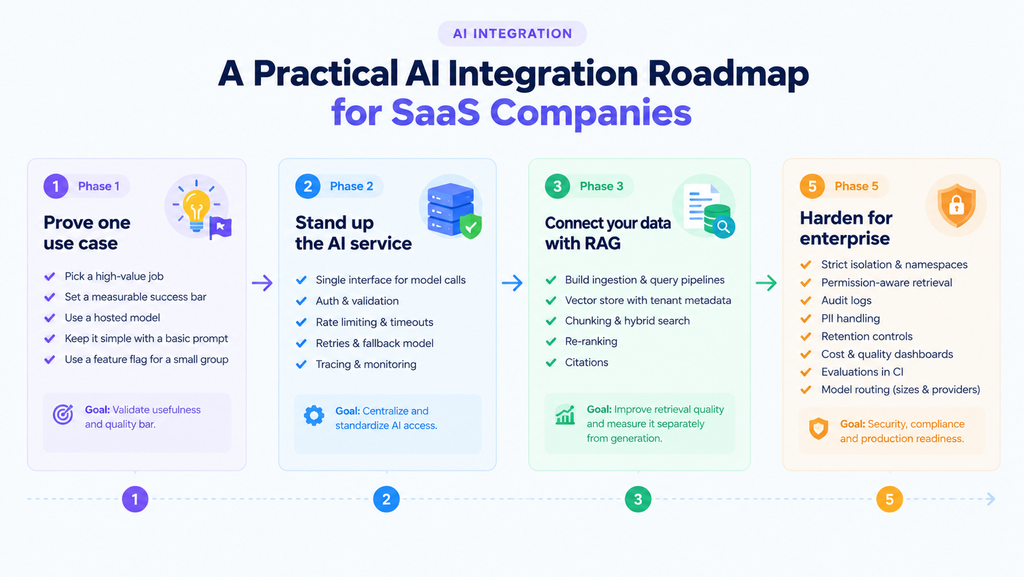
Phase 1 – Prove one use case
Pick a single high-value job with a measurable success bar. Build it with a hosted model and the simplest prompt that works, behind a flag, for a small group. You are testing whether the feature is useful and what quality bar it has to clear, not building infrastructure.
Phase 2 – Stand up the AI service
Move all model interaction behind one service with its own interface, auth, validation, rate limiting, timeouts, retries, a fallback model, and tracing. Every later feature calls this instead of a provider SDK.
Phase 3 – Connect your data with RAG
Build the ingestion and query pipelines, a vector store with tenant-scoped metadata, chunking, hybrid search, re-ranking, and citations. Measure retrieval quality separately from generation so you know which half to fix.
Phase 5 – Harden for enterprise
Strict isolation and namespaces, permission-aware retrieval, audit logs, PII handling, retention controls, cost and quality dashboards, evaluations in CI, and model routing across sizes and providers.
Recommended Modern SaaS Tech Stack for AI Integration
This is a representative shape for a modern SaaS tech stack with AI, not a vendor recommendation. The categories are stable; any mature option in each row can fill it.
| Component | Purpose |
| Frontend framework | Server-rendered UI; streams AI responses; holds no model credentials |
| Backend / API layer | Authn/authz, tenant resolution, validation, rate limiting, entitlements |
| AI service | Prompt orchestration, model routing, guardrails, output validation, tracing |
| LLM provider | Generation and reasoning; hosted API or self-hosted open-weight model |
| Embedding model | Turns documents and queries into vectors for retrieval |
| Vector database | Nearest-neighbor search with tenant-scoped metadata filters |
| Primary database | System of record for app data, permissions, and workflow state |
| Queue / message bus | Buffers events; decouples AI workloads from the request path |
| Workflow engine | Orchestrates multi-step automations with retries and durable state |
| Object storage | Holds uploaded documents and large artifacts used during ingestion |
| Monitoring / tracing | Latency, tokens, cost, error rates, retrieval and workflow quality |
| Authentication | User identity, sessions, and roles reused by every AI endpoint |
| Infrastructure | Isolated compute and networking for AI services and workers |
The point of the table is the boundaries, not the boxes. The AI service is separate from the application API, the vector store is separate from the primary database, and AI workers are separate from web servers. Those separations are what let each part fail or scale without dragging the others down.
How to Choose the Right AI Architecture for Your SaaS
There is no single right architecture. A few questions settle most of the decision.
Start with data sensitivity and compliance. Regulated or highly sensitive data pushes you toward a provider with strong data terms or self-hosting, plus PII redaction and audit logging from the start; without that constraint, a hosted model is fine. Then look at workload shape and latency. Interactive, user-facing features need streaming and small fast models; back-office automation can run slower and cheaper in the background, and high volume justifies queues, caching, and model routing earlier than low volume does.
Tenant count raises the stakes on isolation, so more tenants means namespaces and per-tenant budgets become worth the effort sooner. Model customization is usually less than teams expect: if prompting plus RAG hits your quality bar, skip fine-tuning. Finally, weigh budget against scale. Hosted models with aggressive caching win at small and medium scale; self-hosting can be cheaper per unit once volume is high and sustained. Reuse what you already run (queue, database, auth, monitoring) before standing up new systems for the AI path.
Final Takeaway
AI integration for SaaS is an architecture discipline, not an API call. The model is the easy part and it gets easier every quarter. The work is in the layers around it a dedicated AI service that owns orchestration and guardrails, retrieval that stays honest about your permission model, asynchronous workflows that keep slow work off the request path, security that assumes prompt injection and cross-tenant leakage are real, observability that measures whether answers are correct and not just whether the endpoint is up, and cost controls that keep a popular feature from eating your margin.
The teams that do this well treat the model as one more production dependency with a contract. They also build in phases: prove a use case, extract a service, add retrieval, automate a workflow, then harden for enterprise. They do not try to stand up the whole platform at once. That discipline is what separates a feature customers rely on from one that demos well and quietly gets switched off.