
A website migration can solve real problems: slow hosting, an outdated CMS, a rebrand, a new domain, or a redesign. But it can damage organic visibility if URLs disappear, redirects misfire, or search engines cannot crawl the new site.
A website migration SEO plan should improve the platform or user experience while preserving the signals that help search engines understand your content, and helping visitors reach the right page. That requires planning before launch, technical checks on launch day, and careful monitoring afterward.
No process guarantees unchanged rankings. Google needs time to recrawl URLs, so temporary fluctuations can happen. A structured plan reduces avoidable errors.
Define the migration scope before changing anything
Start by identifying exactly what is changing. It may involve hosting, a domain, HTTPS, a new CMS, URL changes, or several changes at once. More simultaneous changes make traffic drops harder to diagnose.
If the domain and URLs will stay the same, follow a hosting migration plan: prepare the new server, test the copied site, update DNS, and monitor both environments. If URLs will change, add a detailed redirect and URL-mapping plan. Google distinguishes hosting changes from moves that change visible URLs, so use the right checklist for the type of move. For infrastructure changes, review Dropndot’s domain and hosting services before cutover.
For website migration SEO, assign owners for content, development, analytics, DNS, redirects, and approval. Set a launch window when the team is available to respond, and avoid a major release just before a peak sales period or holiday if you can.
Record your current SEO performance
Create a baseline before launch. Export 8–12 weeks of data, or longer if your business is seasonal.
Record:
- Organic clicks, impressions, click-through rate, and average position.
- Landing pages that attract the most organic visits or conversions.
- Queries and pages that generate leads, purchases, or other valuable actions.
- Backlinks pointing to important URLs.
- Indexed pages, crawl errors, page titles, meta descriptions, canonical tags, and current status codes.
Use Google Search Console for search performance and indexing, and analytics for landing-page engagement and conversions. The Search Console Performance report shows clicks, impressions, queries, and individual pages.
This baseline matters for website migration SEO because a sitewide chart can hide page-level losses. Use it as the reference point for later comparisons. For website migration SEO, compare equivalent dates and landing pages after launch. Total clicks could look stable while a handful of high-value product or service pages lose visibility.
Crawl the old site and build a URL map
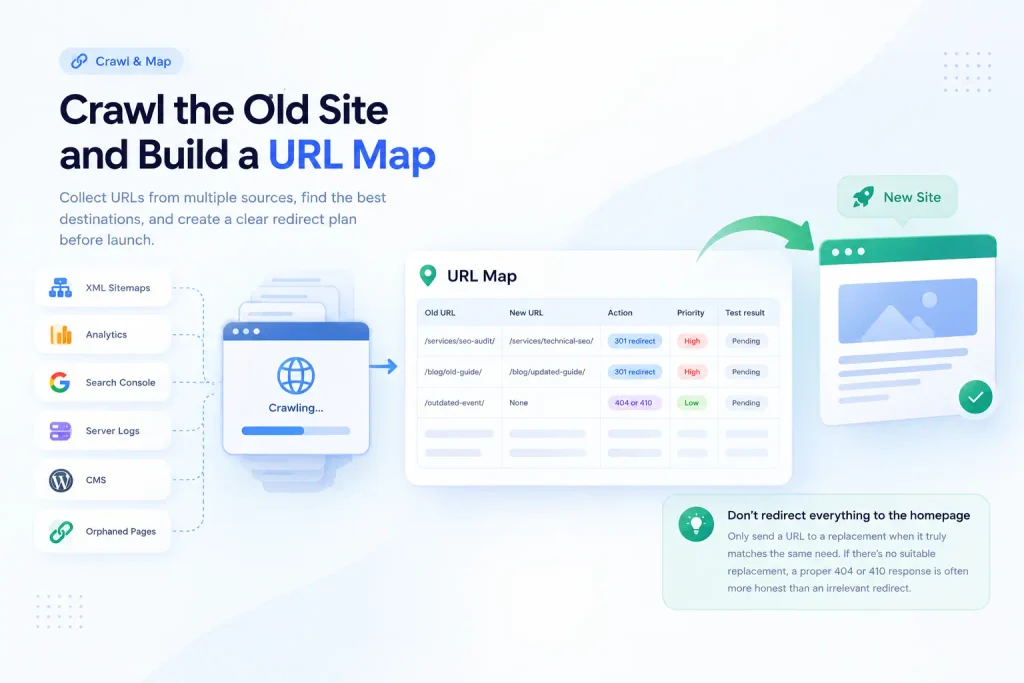
Crawl the old site and export URLs before the environment changes. Combine the crawl with XML sitemaps, analytics, Search Console, server logs, and your CMS. Include orphaned pages with traffic or backlinks, plus important images, downloads, categories, and language variants.
Map each old URL to its closest relevant destination. A spreadsheet can use these columns:
| Old URL | New URL | Action | Priority | Test result |
| /services/seo-audit/ | /services/technical-seo/ | 301 redirect | High | Pending |
| /blog/old-guide/ | /blog/updated-guide/ | 301 redirect | High | Pending |
| /outdated-event/ | None | 404 or 410 | Low | Pending |
Do not redirect every deleted page to the homepage. Send a URL to a replacement only when that destination genuinely satisfies the same need. If there is no suitable replacement, a proper 404 or 410 response is often more honest than an irrelevant redirect.
A URL map is central to website migration SEO. Your spreadsheet should assign an owner and test status to every high-priority redirect. Google recommends identifying important old URLs, mapping them to new destinations, updating internal links, and planning redirects before launch in its site-move documentation.
Prepare and test the new site before launch
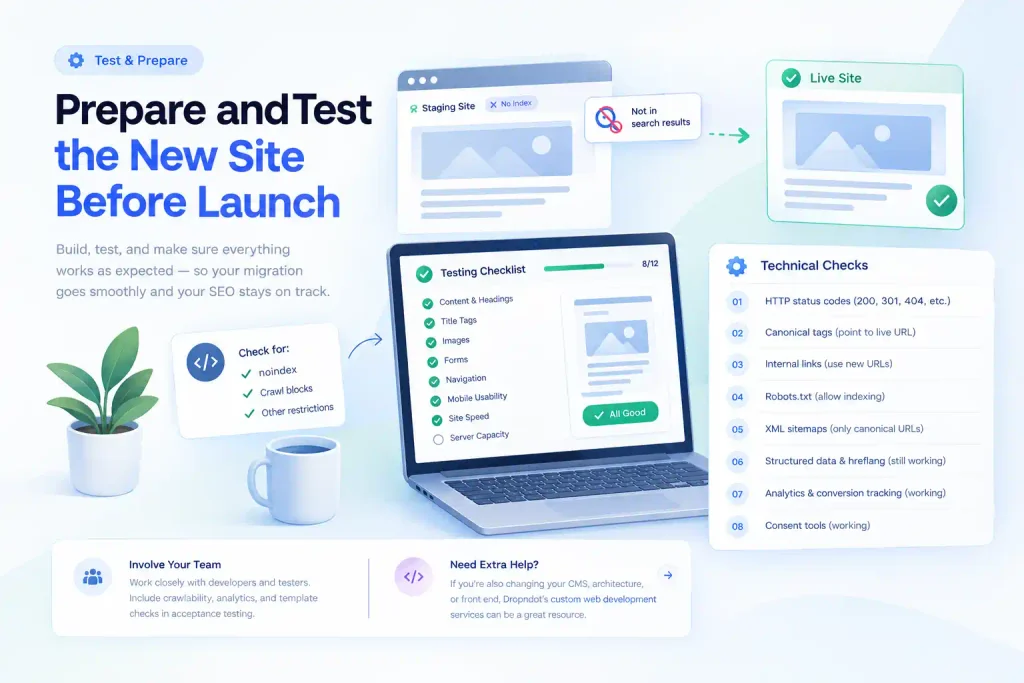
Build and test the site in staging, keeping it out of search results. If you use noindex or crawl blocks, document how to remove them; leaving them in place after launch is a common mistake.
Compare old and new pages. Check important content, headings, title tags, images, forms, crawlable navigation, mobile usability, speed, and server capacity.
Check these technical details before the switch:
- Each important page returns the expected HTTP status.
- Canonical tags point to the intended live URL.
- Internal links use the new URLs, not staging or old-domain addresses.
- Robots.txt allows search engines to crawl content that should be indexed.
- XML sitemaps contain only canonical, indexable URLs.
- Structured data, hreflang annotations, analytics, conversion tracking, and consent tools still work where applicable.
Good website migration SEO also depends on involving developers and testers early. Include crawlability, analytics, and template checks in acceptance testing. Dropndot’s custom web development services can be a relevant resource when the migration also includes a new CMS, architecture, or front end.
Implement accurate permanent redirects
When a URL changes permanently, use a server-side 301 or 308 redirect where possible. Each old page should lead directly to its closest equivalent, with no unnecessary hops. For example:
https://example.com/old-service/ → https://example.com/services/new-service/
Avoid chains such as old URL → temporary URL → category page → final page. They add latency and make troubleshooting harder. Test redirects in bulk, checking both the HTTP status and final destination—not just whether the browser eventually displays a page.
Do not use a redirect to disguise deleted content or send unrelated pages to one destination. Google explains that permanent redirects help communicate a URL move and recommends server-side redirects when possible in its documentation on redirects and Google Search.
Redirects are essential to website migration SEO, but they are not enough. Website migration SEO is safer when every redirect is tested before deployment. Update internal links, canonical tags, navigation, breadcrumbs, structured data, hreflang, and XML sitemaps to reference the new URLs directly. Keep old-domain redirects in place for at least a year; longer retention can help people following old bookmarks and links.
Launch with a controlled checklist
Schedule cutover when traffic is predictable and technical support is available. Take a backup, freeze non-essential changes, and identify who can roll back a failed deployment. Change DNS only after a hosting-only move passes tests; activate redirects during a URL move.
After launch, test key templates: homepage, service pages, posts, categories, product pages, forms, and checkout. Use a crawler to test URLs in bulk.
Confirm that:
- The live site uses the correct HTTPS and preferred hostname.
- No staging links, test banners, or accidental noindex directives remain.
- Redirects work and do not loop.
- Important pages return 200 status codes.
- Forms, purchases, and analytics events are being recorded.
- The new XML sitemap is accessible and submitted in Search Console.
A launch is not complete just because the homepage loads. This website migration SEO checklist should be signed off before launch. Website migration SEO must verify the pages that earn traffic and revenue, not only the pages that are easiest to test.
Monitor search visibility and fix issues quickly

Some movement is normal while search engines recrawl URLs. Google says processing time depends on site size, server speed, and URL discovery; that does not make every decline normal.
Check key pages and server logs daily at first, then review Search Console and analytics weekly. Compare equivalent dates and watch for:
- A sharp fall in organic clicks or impressions for important pages.
- New 404s, redirect loops, server errors, or soft 404s.
- New pages that are crawled but not indexed, or old URLs that remain prominent unexpectedly.
- Traffic shifting to irrelevant destinations.
- Lost conversions or broken analytics events.
Submit the new sitemap to help Google discover new URLs, and use URL Inspection for important pages that appear to be missing. Include these checks in website migration SEO monitoring. The Search Console Sitemaps report shows sitemap submission history and parsing errors. In analytics, use the GA4 Landing page report to compare visits and engagement by entry page.
If a page loses traffic, inspect redirects, indexability, canonicals, content parity, internal links, and server response before changing content. Website migration SEO works best when issues are diagnosed URL by URL.
Common migration mistakes to avoid
Changing too much at once. A new domain, CMS, URL structure, and content strategy make causes harder to isolate; separate changes when practical.
Deleting useful content. Low-traffic pages may have backlinks or support conversions. Review evidence before removing them.
Forgetting non-page assets. Images, PDFs, CSS, JavaScript, and video URLs can matter to users and search engines. Include important assets in your migration plan.
Removing redirects too soon. Old links may continue to receive visits long after launch. Keep redirects available and update external links where you can, especially high-value referring links.
Misreading the traffic dip. Review trends and technical evidence together. An SEO review for a website migration should check traffic, indexability, and conversions together. Escalate if important pages stay unavailable or traffic keeps falling.
Frequently asked questions
Will a website migration always cause a traffic drop?
No. A well-planned migration can preserve visibility, but temporary ranking changes are possible while search engines recrawl and reprocess pages. Errors such as missing redirects or blocked pages can cause more serious losses.
How long does SEO recovery take after a migration?
There is no universal timeline. Small and medium sites may see most URLs processed over several weeks; large sites can take longer. Correct implementation and prompt fixes matter.
Do 301 redirects pass SEO value?
Google treats permanent redirects as a strong canonical signal and says they do not inherently lose PageRank. Relevant destinations still matter.
Should I change my URL structure during a redesign?
Only if there is a clear reason. Keeping URLs unchanged reduces the number of variables. If URLs must change, map every valuable old URL and test the redirects before launch.
Do I need to submit a new sitemap?
If URLs changed, submit an updated sitemap containing the new canonical, indexable URLs. A sitemap helps discovery, but it does not replace redirects or guarantee indexing.
How long should I keep redirects active?
Keep them for at least a year, and consider keeping them longer where feasible. This supports users and search engines that still encounter old URLs through bookmarks, backlinks, or cached references.
What should I do if organic traffic drops sharply after launch?
Check whether important pages return the correct status, redirects reach relevant destinations, the site is crawlable and indexable, canonical tags are correct, and the new sitemap is valid. Compare losses by URL and query in Search Console before making broad changes.
Conclusion: Protect visibility with a migration plan
Successful website migration SEO is a coordinated technical project—not simply a design launch or database transfer. Document existing performance, map old URLs to relevant destinations, test the new environment, use accurate permanent redirects, update internal signals, and monitor results after release.
The practical aim of website migration SEO is to make the transition understandable for both users and search engines while improving the site for the future. If your move involves a complex platform, data, or hosting change, plan the work with your development team and test every critical journey. You can also review Dropndot’s data migration services and quality assurance and testing services to explore support for a controlled transition.